AI shaders
Esta página aún no está disponible en tu idioma.
Describe a background in words, and ButtonsCLI has AI write several versions at once. Each one is compiled and checked before you see it, and you click the one you like. You need a Shader model set up first.
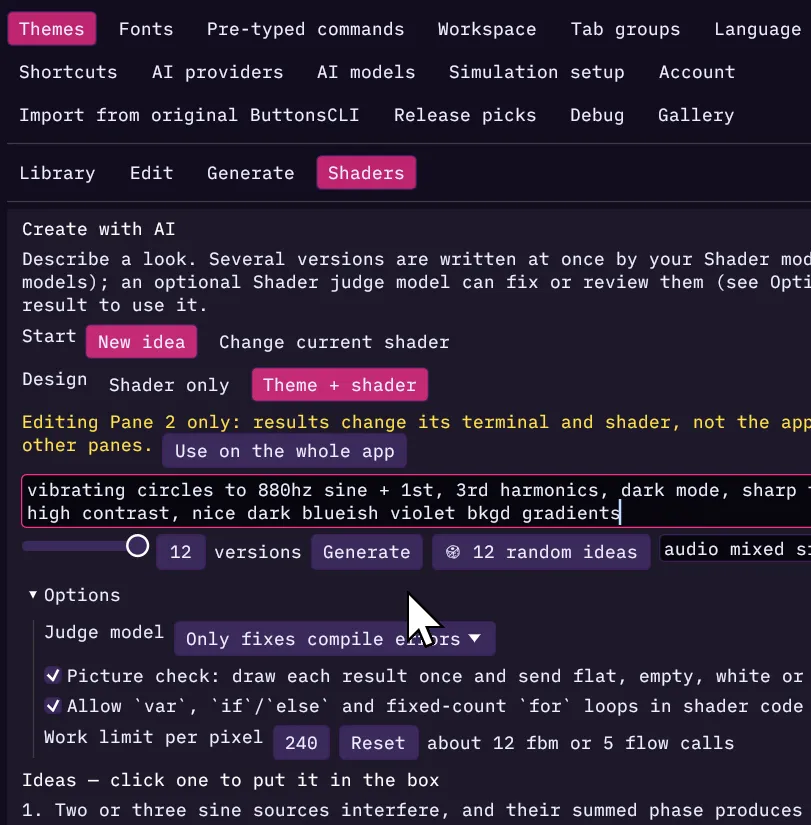
The Create with AI section is on Settings → Themes → Shaders.
Make one
Section titled “Make one”- Pick Start:
- New idea (default) — write from scratch. Your current code and sliders are not sent, so the result isn’t stuck on the old shader.
- Change current shader — send the current code and change it as you describe (“make it slower”, “add stars”, “more purple”).
- Pick Design (shown when AI themes are available):
- Theme + shader (default) — every version also designs a matching theme. See Theme + shader below.
- Shader only — write the shader; the theme stays as it is.
- Pick Colors (Shader only):
- AI picks new ones (default) — every version chooses its own palette to fit the idea.
- Keep this shader’s / Keep the theme’s — build on the colors shown under Style.
- Describe the look. Say what moves, the mood, and the colors, for example: bouncing fireballs with gravity, on a dark red night sky.
- Set versions (1–12) and click Generate.
The line under the buttons — “AI is told to …” — shows exactly what the AI is told about your settings.
What happens while it works
Section titled “What happens while it works”Each version runs through the same steps, shown as a small flowchart:
Write → Check → Judge → Ready
- Write — your Shader model writes the code, a name, and (if allowed) colors and sliders.
- Check — the code is compiled on your machine. Nothing broken gets through. With the picture check on, it is also drawn once off screen; a flat, empty, mostly white or motionless picture goes back to the writer once, with what was wrong.
- Judge — by default only when the code does not compile: the Shader judge model (or, without one, the Shader model) fixes it. Under Options the judge can also review every result, or be switched off.
- Ready — you see a live moving thumbnail. If even the fix fails, the version shows as failed and the others carry on. Hover a thumbnail to see which models wrote and checked it, and what happened.
With several versions, each one gets a different direction (Balanced, Subtle, Bold, Playful, Geometric, Organic, Minimal, Layered, Retro, Dreamy, Cosmic, Graphic) so you get real variety. Stop cancels; finished versions stay.
Options
Section titled “Options”Click Options under the Generate button. They are saved with your profile.
| Option | Default | What it does |
|---|---|---|
| Judge model | Only fixes compile errors | Reviews every result adds one request per version and may rewrite code that works. Off never asks it: the writer fixes its own errors. Good writer models rarely need a judge. |
| Picture check | On | The off-screen drawing test in step 2. A fixed pixel test, not a model: it never judges taste. |
Allow var, if/else and fixed-count for loops |
On | Lets shaders (and the AI) use short loops and branches. It applies to every shader: switched off, shaders that use them stop drawing. See the reference. |
| Work limit per pixel | 240 | How much helper work one shader may do per pixel: about 12 fbm or 5 flow calls. Higher looks richer and costs GPU; 0 is no limit. |
Theme + shader
Section titled “Theme + shader”With Design → Theme + shader, every version designs the whole look from the same idea: app colors, terminal and ANSI colors, the background gradient, fonts (from the bundled ones) and the shader, with the shader’s c1–c5 taken from that theme. Ask for halloween, a rainy Tokyo night or a cozy cabin and everything changes together.
- The theme is checked like an AI theme (colors, text contrast, real fonts and weights). A theme that fails is sent back once with the reason. If it still fails, you still get the shader, and the hover note says why the theme was left out.
- Thumbnails show the new background with a line of terminal text in the theme’s colors.
- Use this one loads the shader and the theme into the draft, which saves as one new theme file: colors, fonts and shader stay together, so picking that theme later brings back the whole look. Parts switched off under Library → Apply to shared (app chrome, terminal colors, fonts) don’t show, and while you edit one pane only that pane’s terminal changes; the message says so. A note above the results also says when a pane, or panes with a theme of their own, keep the result from the whole app; Use on the whole app fixes that in one click.
- Undo AI change puts back only the code; to undo the theme as well, use Revert and close, or pick your old theme in the Library.
For a theme without a shader, see AI themes.
Use a result
Section titled “Use a result”Click a thumbnail. The shader, its colors (as This shader’s) and its sliders move into Style, and the pane updates. You can then change colors, drag sliders, lower Strength, or Save to shader list.
Random ideas
Section titled “Random ideas”Out of ideas? Click 🎲 N random ideas (N follows the versions slider). The Shader model suggests that many different ideas in one go. It’s told the ideas must be drawable by a shader, to name the technique that makes each one work, and to mix simple, elegant ideas with ambitious ones.
- The first idea goes into the prompt box.
- Click any idea in the list to use it instead.
- Write one version per idea writes every idea at once, one version each, from scratch.
- Clear ideas hides the list.
Fix with AI
Section titled “Fix with AI”If code you edited by hand doesn’t compile, the Code section shows the error and a Fix with AI button. The fix goes straight into the code; Undo AI change puts your version back.
Tips for good prompts
Section titled “Tips for good prompts”- Name the motion: drifting, pulsing, orbiting, falling, rippling.
- Name the mood and colors: calm teal and gold, angry neon.
- Keep text in mind: busy, bright patterns fight with text. Ask for “dark edges” or “calm center” if you read a lot in that pane.
- Iterate: generate with New idea, pick the closest one, then switch to Change current shader for “slower”, “fewer stars”, “bigger shapes”.
- Things shaders can’t do: show photos, text or 3D models. They draw everything with math, every frame. Remembering earlier frames (trails, ripples) is an experiment you can switch on in Settings → Debug.
What is sent to the AI
Section titled “What is sent to the AI”Your description, the settings notes (“AI is told to …”), the colors, and — only with Change current shader — the current code and sliders. With Theme + shader, also the current theme’s palette and the bundled font names. Terminal contents are never sent.