
Set up AI
Esta página aún no está disponible en tu idioma.
AI features are optional. To use them, add a connection (where requests go) and choose models for each job.
1. Add a connection
Section titled “1. Add a connection”Open Settings → AI providers and click Add connection.
ChatGPT plan (no API key)
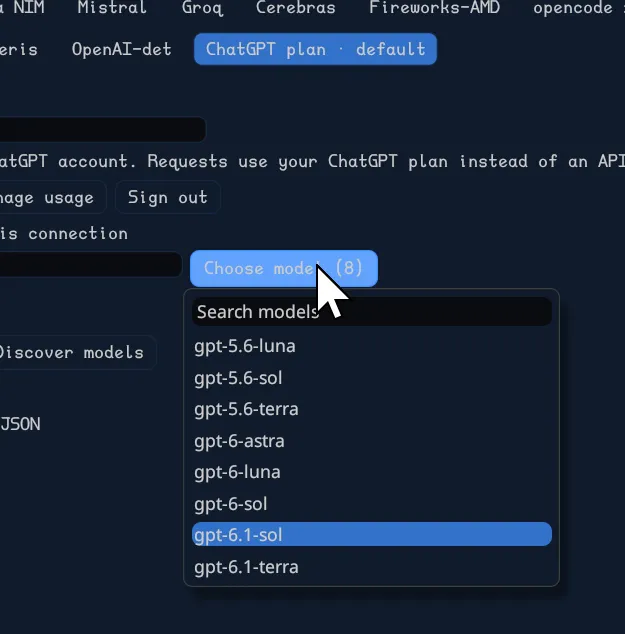
Section titled “ChatGPT plan (no API key)”Click Sign in with ChatGPT (recommended) (or choose ChatGPT plan (sign in) under Add connection), then Continue with ChatGPT. Nothing else needs to be installed. Your browser opens; sign in and allow ButtonsCLI to use your Plus or Pro plan. Back in the app it says Connected as …. If you have not picked a model, the second-newest one in Choose model is filled in; change it any time. Requests then count against your ChatGPT plan instead of an API bill.
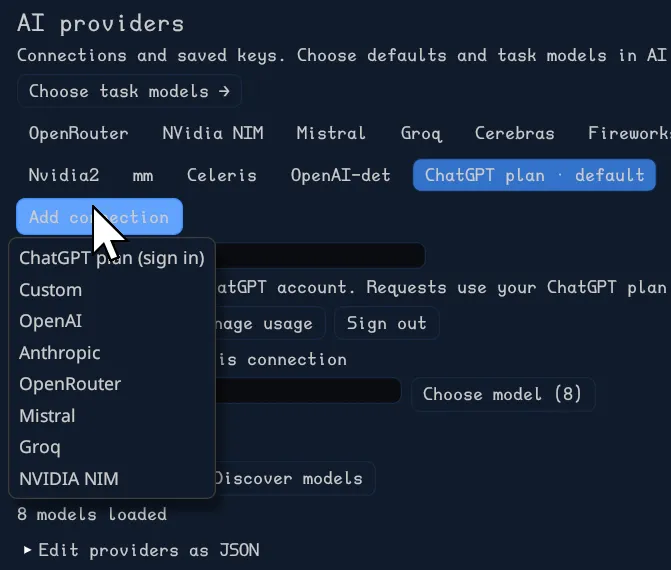
Choose model lists the models your plan offers; type to search.
API key
Section titled “API key”Choose an OpenAI-compatible or Anthropic connection, enter the endpoint and model, and paste your key. Keys are stored in your operating system’s credential store (Windows Credential Manager, macOS Keychain, Secret Service on Linux), never in a settings file.
Endpoints must use https://. Plain http:// is accepted only for servers
on this computer or your local network (localhost, 127.0.0.1,
192.168.x.x, 10.x.x.x, name.local and similar), such as Ollama or LM
Studio, so a key is never sent unprotected over the internet.
For shaders and Theme + shader, an affordable fast model works well: for example Claude Haiku through OpenRouter, or DeepSeek.
2. Choose models
Section titled “2. Choose models”Open Settings → AI models. Under Main model · default for all tasks, pick a connection and a model. Every job uses it, so one choice is enough to start.
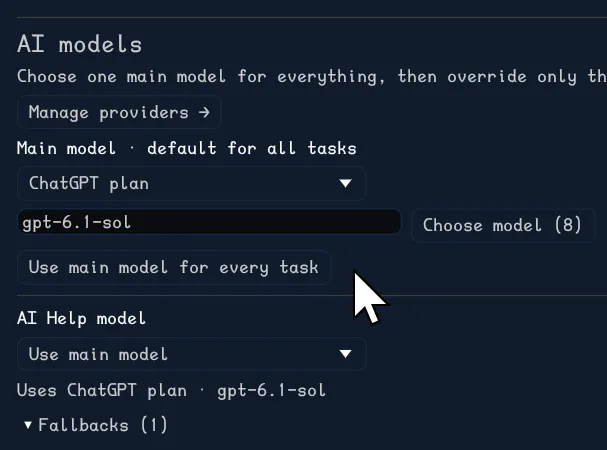
Each job below it starts as Use main model. Pick another connection and model there to give that job its own; Use main model for every task clears those choices again.
| Job | Used by |
|---|---|
| AI Help model | The AI Help chat |
| Theme generation model | AI themes: the theme part of Theme + shader, and the Generate tab |
| Shader generation model | Writing AI shaders and random ideas |
| Shader judge model | Optional. Fixes shaders that do not compile (and, if you choose so under Create with AI → Options, reviews every one). Without it, the Shader model fixes its own. A different model gives a real second opinion. |
| Simulated terminal model | The simulated terminal demo |
Add fallback adds a second choice that is used if the first one fails or is busy.
Privacy
Section titled “Privacy”- You choose every provider; nothing is sent anywhere until you click a Generate, Help or similar button.
- Terminal contents are only sent by AI Help, and only when you include them.
- Shader and theme requests send your description and the settings noted in each page, never your terminal text.