
AI themes
このコンテンツはまだ日本語訳がありません。
The best way to get an AI-made theme is on the Shaders tab. Create with AI writes up to 12 complete looks from one description: app colors, the 16 terminal colors, the background gradient, fonts and a matching animated background.
You need a Theme generation model and a Shader generation model set up; the main model covers both.
Make one
Section titled “Make one”- Open Settings → Themes → Shaders and find Create with AI.
- Next to Design, make sure Theme + shader is picked. With Shader only you get a background and your theme stays as it is.
- Describe it: a cozy autumn cabin at dusk, high-contrast neon for late night work, make the app look like Halloween.
- Set versions and click Generate.
- Click Use this one under the look you like, then save it. Colors, fonts and shader are kept together in one theme file.
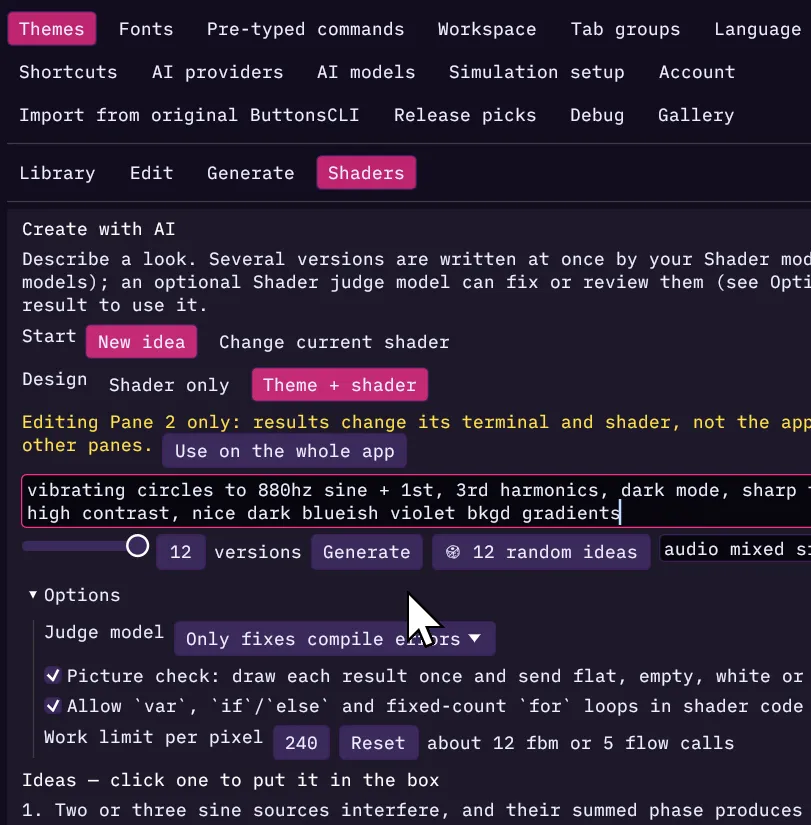
AI shaders explains the steps, the checks and what happens when you edit a single pane.
Want the theme without motion? Lower Strength on the Shaders tab, or switch the shader off: the colors and fonts stay.
The Generate tab
Section titled “The Generate tab”Settings → Themes → Generate is the older way. It writes one theme at a time, with no shader:
- Describe the theme.
- Optional: tick Allow installed and custom fonts (less portable) to let it pick fonts from your system, not only the bundled ones.
- Click Generate theme. It takes about 20–30 seconds; Cancel generation stops it.
The theme previews on your terminals straight away (or on the pane picked under Edit for). Then choose:
| Button | Does |
|---|---|
| Save as theme | Saves it as a new personal theme. Never overwrites one you have. |
| Edit in theme library | Opens it in the Edit tab to adjust colors first. |
| Discard candidate | Throws it away and puts your previous look back. |
Unsaved edits are saved first as a numbered copy, so nothing is lost.
Checks
Section titled “Checks”Every theme is checked before you see it: its shape, the contrast of text against backgrounds, and that the fonts exist. A theme that fails goes back to the model once with the reason. Bad themes are never applied.
What is sent
Section titled “What is sent”Your description, the current theme’s palette, and the font names it may use. Terminal contents and keys are never sent.